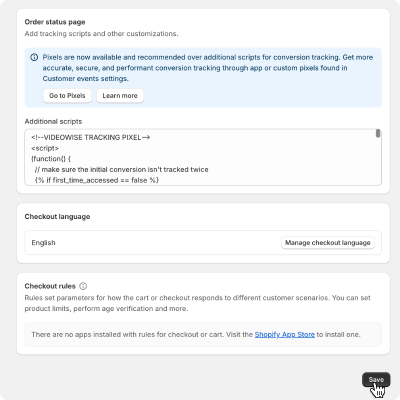
# Cookies
Source: https://docs.videowise.com/cookies
## Cookies for Widgets and Live Shopping
We use cookies to enhance the functionality of our widgets and live shopping features. Below is a list of cookies we use, along with their duration and type.
### List of Cookies
| Name | Duration | Type |
| ---------------------------- | -------------------------------------------------- | ---------- |
| REEVIEW\_SESSION | 30 mins | functional |
| reeview\_tracks\_views | 24 hours | functional |
| reeview\_uid | 14 days | analytics |
| reeview\_uid (Live Shopping) | 1 day (anonymous user) / 365 days (logged in User) | analytics |
| reeview\_unique\_uid | 24 hours | analytics |
| reeview\_lsid | 30 days | functional |
### Cookies Usage
Videowise uses only `functional` and `analytics` cookies. We do not use cookies for advertising or marketing.
`Functional cookies`: keep Videowise working properly (e.g., session management, feature settings, playback/performance).
`Analytics cookies`: help us understand usage so we can improve Videowise (e.g., conversion rates, feature adoption, engagement). Reports are aggregated.
We don’t store names, emails, or other personally identifiable information in cookies. Any identifiers are pseudonymous and used only to operate and improve the product.
For details, see our cookie policy here: [https://videowise.com/privacy](https://videowise.com/privacy).
# Live Shopping
Source: https://docs.videowise.com/custom-events-ls
The Videowise Live Shopping now supports interception and tracking of custom events. This provides customers with a more comprehensive view of user interactions with video content
To intercept and handle these custom events, customers can utilize the `window.addEventListener` method. Below is an example of how to listen for these events:
```javascript Code Block Example theme={null}
window.addEventListener("videowiseLiveOnInteraction", (event) => {
console.log(event.detail.interactionType); // for example mute_player
console.log(event.detail); // return Data from event
});
```
## Events
### videowiseLiveOnPlay
Triggered when the live stream is playing.
* `clientTS`
* `currentTime`
* `device`
* `eventType`
* `interactionType = resume_player`
* `isLive`
* `lsId`
* `organisationId`
* `siteId`
* `uid`
* `url`
* `videoElapsedMinutes`
* `videoElapsedSeconds`
### videowiseLiveOnStop
Triggered when the live stream is closed.
* `clientTS`
* `currentTime`
* `device`
* `eventType`
* `interactionType = close_player`
* `isLive`
* `lsId`
* `organisationId`
* `siteId`
* `uid`
* `url`
* `videoElapsedMinutes`
* `videoElapsedSeconds`
### videowiseLiveOnInteraction
Triggered when a user executes a specific interaction during the live stream.
* `clientTS`
* `currentTime`
* `device`
* `eventType`
* `interactionType`
* `isLive`
* `lsId`
* `organisationId`
* `siteId`
* `uid`
* `url`
* `videoElapsedMinutes`
* `videoElapsedSeconds`
The interactonType can be:
* `mute_player`
* `unmute_player`
* `pause_player`
* `resume_player`
* `like_reaction`
* `share`
* `add_to_calendar`
* `send_chat`
* `minimize_player`
* `maximize_player`
* `show_product_list`
* `hide_product_list`
* `product_click`
* `add_to_cart`
* `checkout`
* `show_cart`
* `hide_cart`
* `replay`
* `progress`
If `interactionType = share` then the event will contain in addition:
* `socialShare`
If `interactionType = product_click | add_to_cart` then the event will contain in addition:
* `item` (which is data about product from the live stream)
### videowiseLiveStreamingPlayerInit
Triggered when the live streaming player is initialized.
# Widgets
Source: https://docs.videowise.com/custom-events-widget
The Videowise Widget now supports interception and tracking of custom events. This provides customers with a more comprehensive view of user interactions with video content
To intercept and handle these custom events, customers can utilize the `window.addEventListener` method. Below is an example of how to listen for these events:
```javascript Code Block Example theme={null}
window.addEventListener("videowiseVideoClick", (event) => {
// Your code here
});
```
```javascript Code Block Example theme={null}
window.addEventListener("videowiseVideoClick", (event) => {
console.log("videowiseVideoClick executed");
console.log(event.detail); // return Data from event
});
```
## Events
### videowiseProductAddToCart
Triggered when a user adds a product to the cart.
* productName
* productId
* variantId
* selectedVariant
* qty
* price
* currencyCode
* videoTitle
* videoId
* widgetId
* deviceType
* url
### videowiseVideoClick
Triggered when a user clicks on a video.
* videoTitle
* videoId
* widgetId
* deviceType
* url
### videowiseVideoStart
Triggered when a video played more than 3 seconds.
* videoTitle
* videoId
* widgetId
* deviceType
* url
### videowiseVideoFull
Triggered when played more than 80% of the video.
* videoTitle
* videoId
* widgetId
* deviceType
* url
### videowiseVideoSwipe
Triggered when a user swipes a video.
* videoTitle
* videoId
* widgetId
* deviceType
* url
### videowisePlayerClose
Triggered when a user closes the player.
* videoTitle
* videoId
* widgetId
* deviceType
* url
### videowiseVideoSoundOn
Triggered when a user turns on the sound of the video.
* videoTitle
* videoId
* widgetId
* deviceType
* url
### videowiseVideoSoundOff
Triggered when a user turns off the sound of the video.
* videoTitle
* videoId
* widgetId
* deviceType
* url
### videowiseProductClick
Triggered when a user clicks on a shoppable product.
* productId
* productName
* videoTitle
* videoId
* widgetId
* deviceType
* url
### videowiseProductBuyNow
Triggered when a user clicks on the buy now button of a shoppable product.
* productId
* productName
* variantId
* selectedVariant
* qty
* price
* currencyCode
* videoTitle
* videoId
* widgetId
* deviceType
* url
### videowiseVideoBounce
Triggered when a user close/swipe the video without playing it, noted video played less than 3 seconds.
* videoTitle
* videoId
* widgetId
* deviceType
* url
### videowiseDataReady
Triggered when the widget has all the necessary data and is ready for rendering
* widgetIds
* deviceType
* url
### videowiseCampaignReady
Triggered after campaign rendered
* campaignId
* deviceType
* url
### videowiseCampaignCheckout
Triggered before redirecting the user to the Shopify checkout page
* campaignId
* deviceType
* url
* items \[array]
* productName
* productId
* qty
* price
* currencyCode
### videowiseCtaClick
Triggered when a user clicks on a call to action button.
* videoTitle
* videoId
* widgetId
* deviceType
* buttonClicked (text in the button)
* url
### videowiseCheckoutClick
Triggered when a user clicks the checkout button on the cart.
* products \[array]
* productId
* productName
* variantId
* selectedVariant
* qty
* price
* currencyCode
* videoTitle
* videoId
* widgetId
* deviceType
* url
### videowiseExpandedProducts
Triggered when a user expands the shoppable products list on an inline widget.
`event.detail` is an array (`product[]`) containing the expanded products.
# Widget re-rendering
Source: https://docs.videowise.com/init
How to manually trigger the rendering of widgets.
### Rendering floating widgets (quizes, founder videos, etc)
This applies to all types of widgets that don't require a HTML container.
```js Floating widgets theme={null}
initVideowise();
```
### Rendering inline widgets (stories, carousels, grids, etc)
This applies to all types of widgets that do require a HTML container.
#### Widgets on a product page
```js Inline widgets on product page theme={null}
initVideowiseBulk({
shop: 'your-store.myshopify.com';
widgetIds: ['widget-id'];
productId: 'shopify product id';
device: 'DESKTOP' | 'MOBILE'; //optional
})
```
#### Widgets on a non-product page
```js Inline widgets on non-product page theme={null}
initVideowiseBulk({
shop: 'your-store.myshopify.com';
widgetIds: ['widget-id'];
url: 'https://your-store.myshopify.com/your/url';
device: 'DESKTOP' | 'MOBILE'; //optional
})
```
# Installation
Source: https://docs.videowise.com/installation
Learn how to install the Videowise Widget on your site.
### Videowise Widget Code
Add the following script at the head on your site:
```html Code Block Example theme={null}
```
For Shopify v2 users the script is added automatically using Videowise app.
# Live stream rendering
Source: https://docs.videowise.com/live-stream-rendering
How to manually trigger the live stream pop-up.
### Opening the live stream player with Videowise's global helper function
Videowise provides a helper function, available in the global window object, that allows the opening of the live stream player from any page on your website.
The function can be attached to onClick events and receives a single parameter, the live stream ID, which can be copied from the Videowise application.
```js Launch live stream theme={null}
window.videowiseLaunchLive("live-stream-id-here");
```
### Auto-launching the live stream player via URL parameter
You can now automatically open the Videowise live stream player using the `vwLsId` query parameter. When this parameter is present in the page URL and contains a valid live stream ID, the player will launch automatically without requiring any user interaction. This makes it easy to share direct links that trigger live playback on load.
```js Auto-launching theme={null}
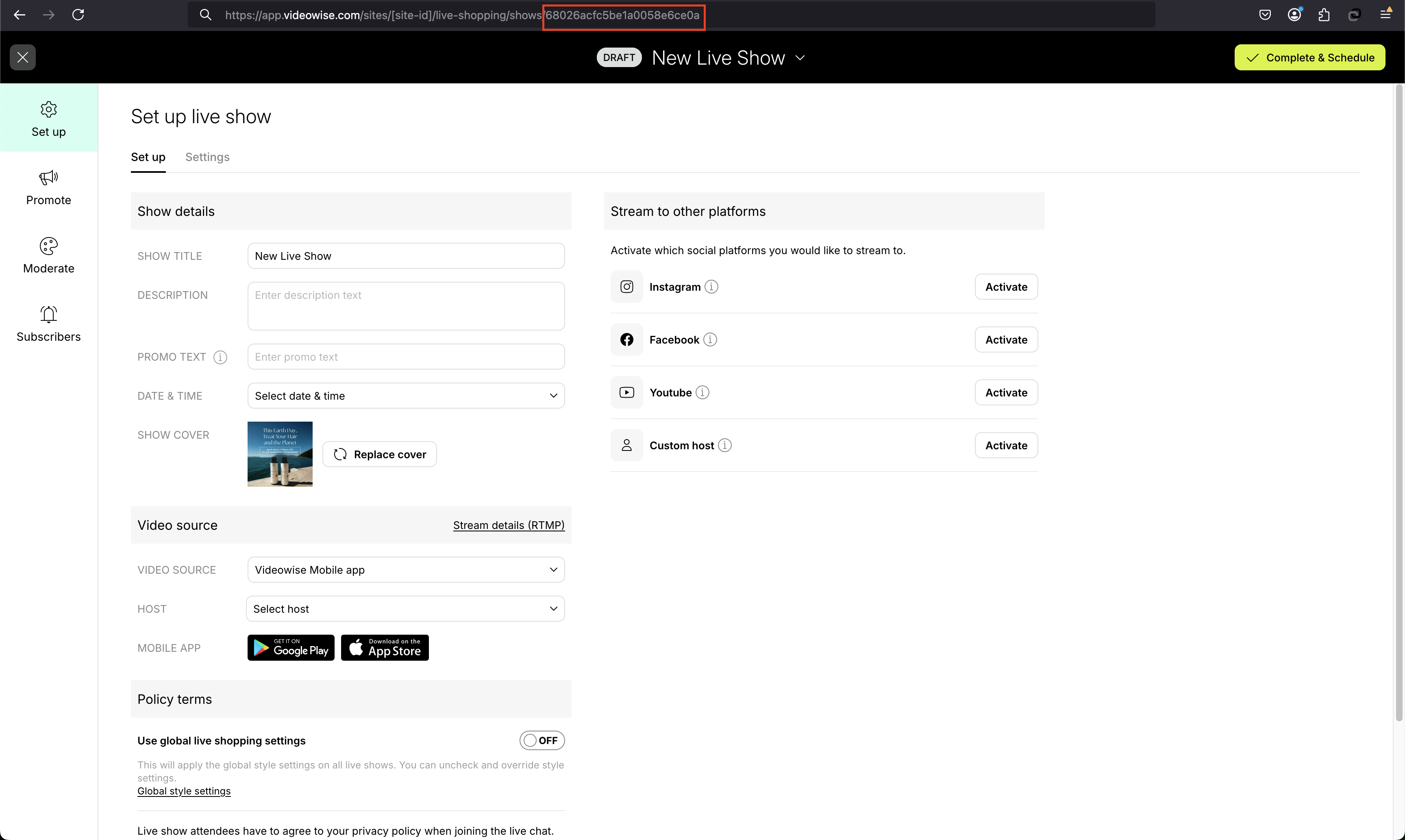
https://example.com/?vwLsId=68026acfc5be1a0058e6ce0a
```
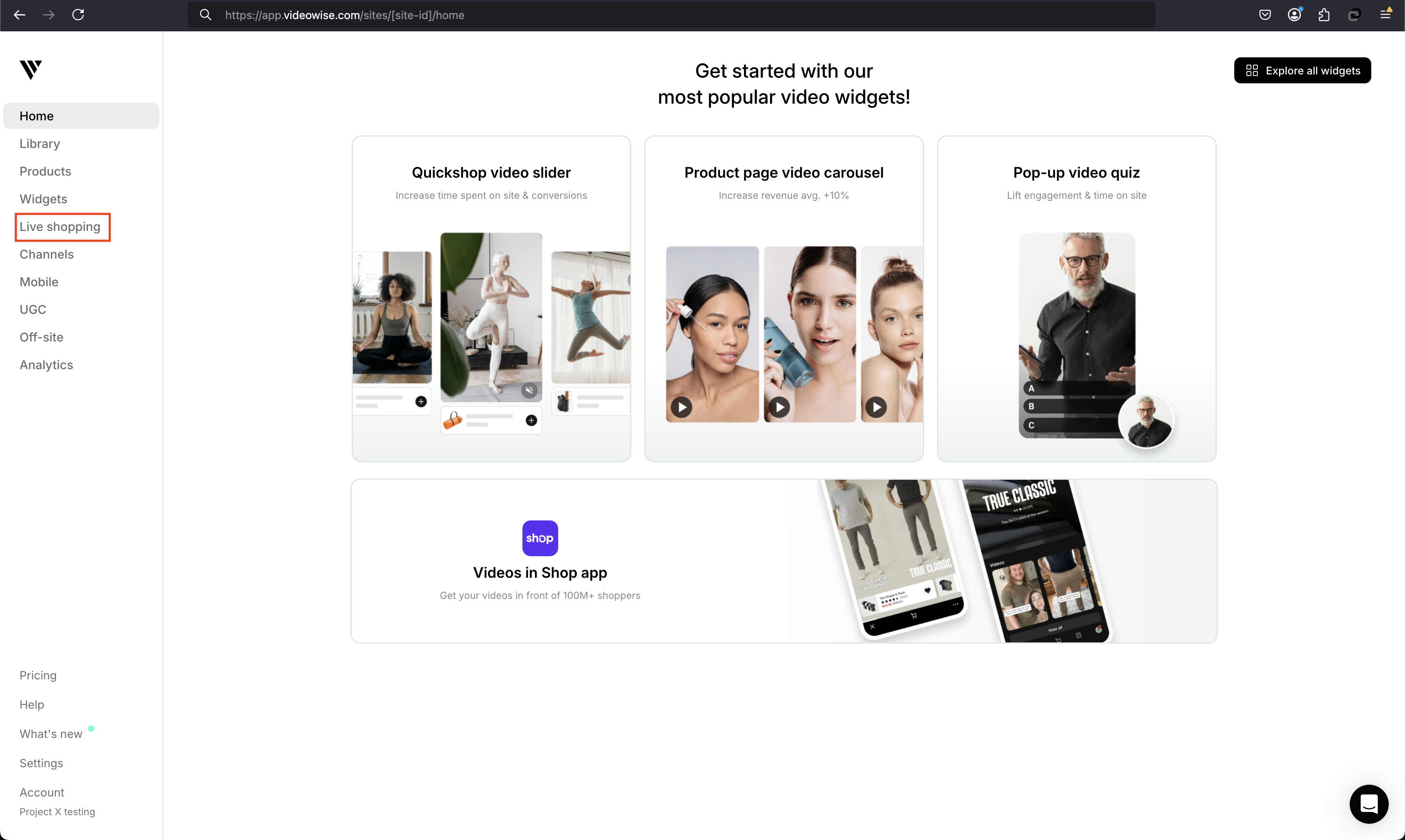
#### 1. Go to live shopping
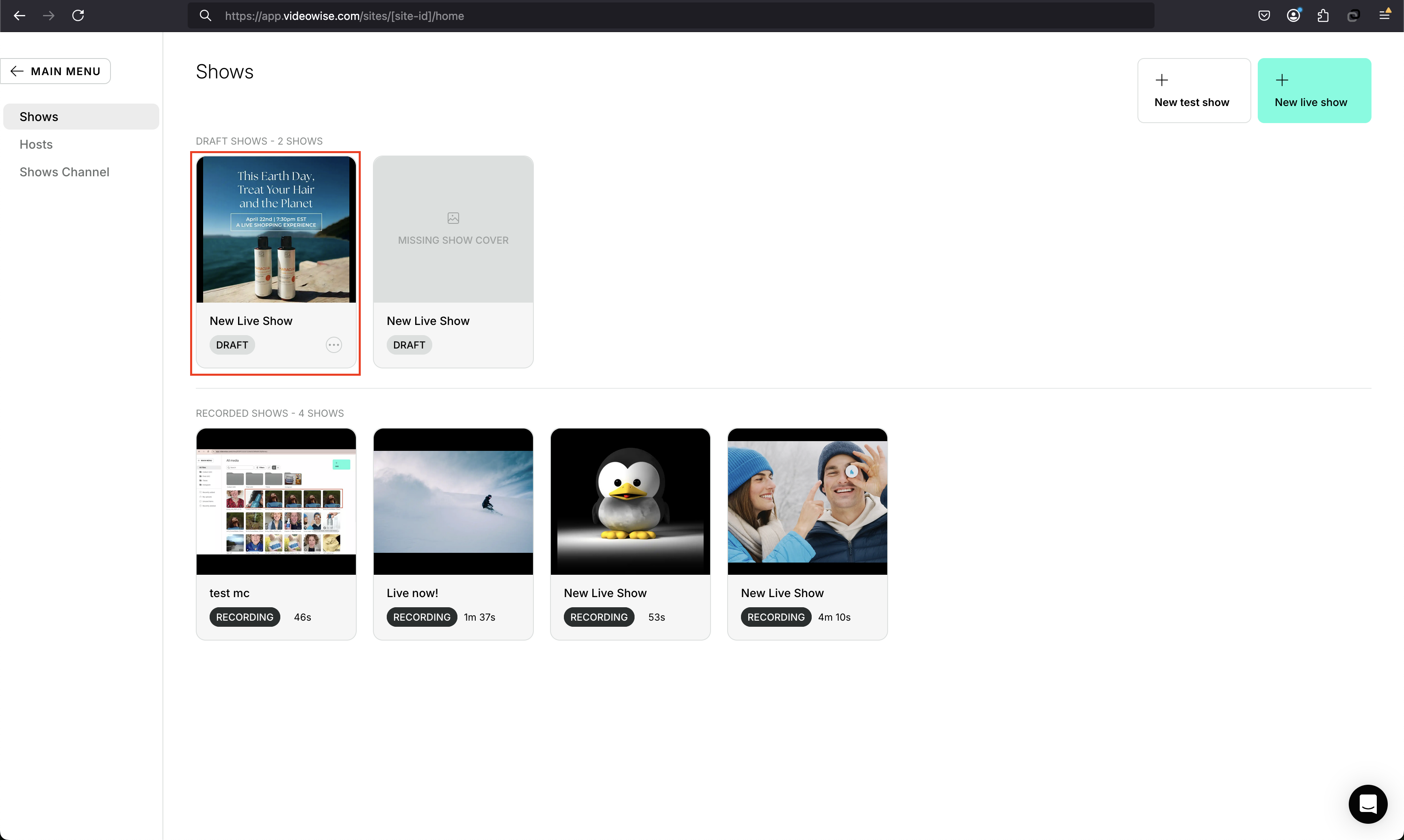
#### 2. Open the live show
#### 3. Copy the ID from the URL
# Other
Source: https://docs.videowise.com/pixel/custom
Learn how to install the Videowise Custom Pixel Code on your site.
### Custom Pixel Code
```js theme={null}
// VIDEOWISE TRACKING PIXEL
function VWPixel({ orderId, orderTotal, orderCurrency, orderItems }) {
var PIXEL_VERSION = "1.9.1";
var UID_COOKIE_NAME = "reeview_uid";
var CAMPAIGN_COOKIE_NAME = "reeview_campaign";
var LS_COOKIE_NAME = "reeview_lsid";
var REFERRAL_COOKIE_NAME = "reeview_referral";
var WIDGET_EXPERIMENT_COOKIE_NAME = "REEVIEW_SESSION";
function getCookie(name) {
let cookieArr = document.cookie.split(";");
for (let i = 0; i < cookieArr.length; i++) {
let cookiePair = cookieArr[i].split("=");
if (name === cookiePair[0].trim()) {
return decodeURIComponent(cookiePair[1]);
}
}
return null;
}
function deleteCookie(name) {
document.cookie =
name + "=; expires=Thu, 01 Jan 1970 00:00:00 UTC; path=/;";
}
function objectToQueryString(obj) {
let result = "";
var keys = Object.keys(obj);
for (let i = 0; i < keys.length; i++) {
var key = keys[i];
result += `${key}=${obj[key]}`;
if (i < keys.length - 1) {
result += "&";
}
}
return result;
}
function getDeviceType() {
var size = 1024;
var isDesktop = window.screen.width > size;
return isDesktop ? "DESKTOP" : "MOBILE";
}
var shop = window.location.host;
if (getCookie(UID_COOKIE_NAME) && shop && orderId && orderTotal) {
var params = {
uid: getCookie(UID_COOKIE_NAME),
deviceType: getDeviceType(),
orderId,
shop,
checkout_type: "OTHER",
order_total: orderTotal,
currency: orderCurrency,
order_items: orderItems.length,
campaignId: getCookie(CAMPAIGN_COOKIE_NAME),
lsId: getCookie(LS_COOKIE_NAME),
clientTs: new Date().toISOString(),
experiment: getCookie(WIDGET_EXPERIMENT_COOKIE_NAME),
referral: getCookie(REFERRAL_COOKIE_NAME),
order_products: encodeURIComponent(JSON.stringify(orderItems)),
pixel_version: PIXEL_VERSION,
};
var trackingUrl = `https://api.videowise.com/tracking/pixel?${objectToQueryString(
params
)}`;
fetch(trackingUrl).then((res) => {
console.log(
`Videowise pixel -- order -- (version: ${PIXEL_VERSION}) executed correctly`
);
deleteCookie(CAMPAIGN_COOKIE_NAME);
});
}
}
```
```ts The order item object type is: theme={null}
type OrderItem = {
id: string;
quantity: number;
title: string | null;
variant: {
id: string;
image: {
src: string | null;
};
price: {
amount: number;
currencyCode: string;
};
product: {
id: string;
title: string | null;
vendor: string | null;
type: string | null;
untranslatedTitle: string | null;
url: string;
};
sku: string | null;
title: string;
untranslatedTitle: string;
};
finalLinePrice: {
amount: number;
currencyCode: string;
};
};
```
## Running the pixel
Copy the pixel code and use it as a custom js script on your website.
Whenever you have a successful order, call the `VWPixel` function with the following arguments:
* `orderId`: The order ID
* `orderTotal`: The order total
* `orderCurrency`: The order currency
* `orderItems`: The order items
**Note**: some keys are optional, but it's recommended to pass all the arguments.
Example:
```js theme={null}
VWPixel({
orderId: "1234567890",
orderTotal: 100,
orderCurrency: "USD",
orderItems: [
{
id: "1234567890",
quantity: 1,
title: "Product 1",
variant: {
id: "1234567890",
image: {
src: "https://example.com/image.jpg",
},
price: {
amount: 100,
currencyCode: "USD",
},
product: {
id: "1234567890",
title: "Product 1",
vendor: "Vendor 1",
type: "Type 1",
untranslatedTitle: "Product 1",
url: "https://example.com/product/1234567890",
},
sku: "1234567890",
title: "Product 1",
untranslatedTitle: "Product 1",
},
finalLinePrice: {
amount: 100,
currencyCode: "USD",
},
},
],
});
```
# Magento
Source: https://docs.videowise.com/pixel/magento
Learn how to install the Videowise Order Tracking Pixel on your Magento store.
# Pixel Integration for Magento
## Introduction
This document provides instructions on how to integrate Order Tracking Pixel with Magento.
Our Magento implementation includes the Order Tracking Pixel pre-installed on the default Thank you page.
If you are utilizing the default Thank you page, no further action is required.
## Prerequisites
* Magento 2.x installed
* Admin access to your Magento backend files
* Videowise Pixel Tracking activated from Videowise Application
## Integration Options
There are two options to integrate the Order Tracking Pixel on other pages in your Magento store:
### Option 1: Using Magento XML Frontend Extensions
You can add our already defined PHTML block to your preferred location using Magento XML frontend extensions. This method involves updating your layout XML file to include the tracking pixel block. Here is an example:
```xml theme={null}
```
Replace `your-container-name` with the appropriate container name where you want the tracking pixel to be placed.
## Option 2: Adding Custom JavaScript Code
Alternatively, you can add custom JavaScript code to your preferred location after a successful order. You will need to complete the necessary fields in the script. Here is an example:
```JavaScript theme={null}
```
Make sure to replace the placeholders (`{{ ... }}`) with the actual values from your Magento store.
All actual values can be retrieved manually with custom code or using our PHP public method `getOrderData` from `Videowise\VideowiseApp\Block\VideowiseTrackingPixel` which will return the following array:
```PHP theme={null}
[
'orderId' => 123, // Last Order ID from User Session
'orderTotal' => 123, // Order Total
'orderCurrency' => 'USD', // Order Currency
'orderItemsTotal' => 2, // Number of Order Products
'storeId' => 1, // Order Store ID
]
```
## Conclusion
You have successfully integrated Pixel with your Magento store. For further customization and advanced features, refer to our [FAQ page](https://videowise.com/faq).
# Overview
Source: https://docs.videowise.com/pixel/overview
Overview
This page provides an overview of the Order Tracking Pixel for various e-commerce platforms. Click on the links below to learn more about the implementation for each platform.
* [Shopify](/pixel/shopify)
* [Magento](/pixel/magento)
* [SFCC](/pixel/sfcc)
* [Other](/pixel/custom)
# Salesforce Commerce Cloud
Source: https://docs.videowise.com/pixel/sfcc
Learn how to install the Videowise Order Tracking Pixel on your SFCC instance.
# Pixel Integration for SFCC
## Introduction
This document provides instructions on how to integrate Order Tracking Pixel with SFCC.
Our Salesforce Commerce Cloud implementation includes the Tracking Pixel pre-installed on the default Order Confirmation Page.
If you are utilizing the default Order Confirmation Page, no further action is required.
## Prerequisites
* Salesforce Commerce Cloud instance
* Admin access to your Salesforce Commerce Cloud instance
* Videowise Pixel Tracking activated from Videowise Application
* Videowise Cartridge in your Business Manager Cartridge path
## Integration Options
There are two options to integrate the Order Tracking Pixel on other pages on your SFCC instance:
### Option 1: Adding our pre-defined ISML code to your files
You can add our already pre-defined ISML code to your preferred location. This method involves updating your ISML file to include our code.
For example let's modify the `template/default/checkout/confirmation/confirmation.isml`:
`dw.order.Order` object must be present in the PipelineDictionary (pdict) as key `order`
1. You will need to add our `` to the top of the file right under your decorate template (``)
```HTML theme={null}
Videowise SFCC
var shouldTrackPurchase = dw.system.Site.getCurrent().getCustomPreferenceValue('videoWiseEnabled');
var trackingAPIUrl = dw.system.Site.getCurrent().getCustomPreferenceValue('videowiseTrackingApiUrl');
if (shouldTrackPurchase) {
assets.addJs('/js/videowisePurchaseTracking.js');
}
```
2. Add our `` right before decorator ends
```HTML theme={null}
```
Order Tracking Pixel should now be available after the next successful order.
## Option 2: Adding Custom JavaScript Code
Alternatively, you can add custom JavaScript code to your preferred location after a successful order. You will need to complete the necessary fields in the script. Here is an example:
```JavaScript theme={null}
```
Make sure to replace the placeholders (`{{ ... }}`) with the actual values from your SFCC instance.
All actual values can be retrieved manually with custom code or using our Javascript Helper public method `getTrackingPixelData` from `cartridge/scripts/helpers/videoWiseHelpers.js` which will return the following object:
```JavaScript theme={null}
{
grandTotal: 123, // Order Grand total
orderNumber: 'ODEV-123', // Order Number
productQuantityTotal: 5, // Order Total products quantity
currency: 'USD', // Order Currency Code
shop: 'https://instanceURL.com' // Order Instance URL
}
```
Order Tracking Pixel should now be available after the next successful order.
## Conclusion
You have successfully integrated Pixel with your SFCC instance. For further customization and advanced features, refer to our [FAQ page](https://videowise.com/faq).
# Shopify
Source: https://docs.videowise.com/pixel/shopify
Learn how to install the Videowise Widget on your site.
### Customer Events Pixel Code
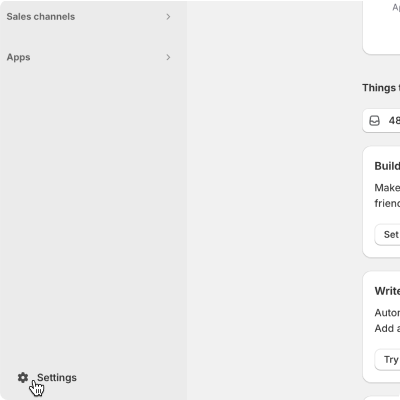
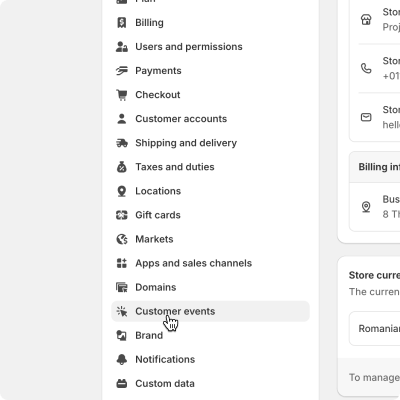
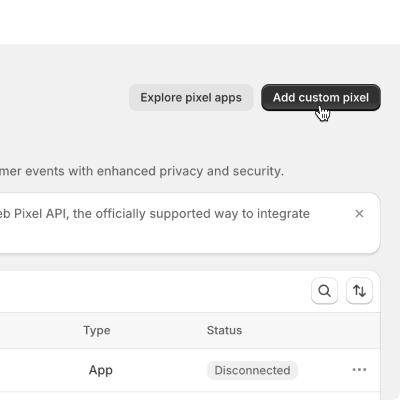
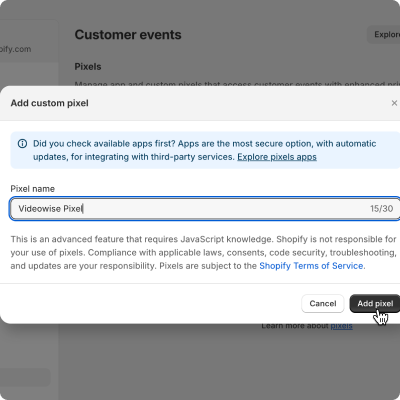
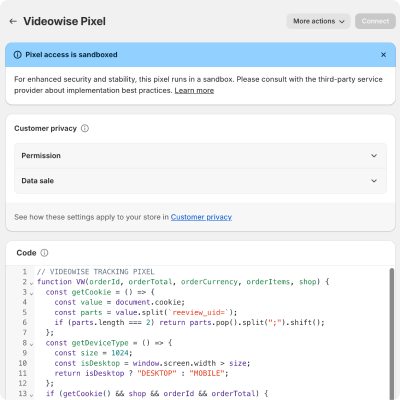
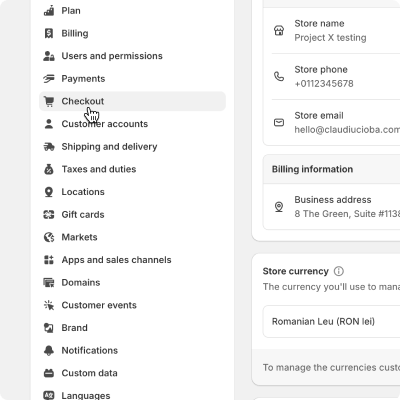
If your Shopify version supports web pixels go to "Settings -> Customer events" and click the "Add custom pixel". Give the new pixel a name like "Videowise Pixel" and add the following pixel code:
```js Customer Events Pixel Code theme={null}
// VIDEOWISE TRACKING PIXEL
const PIXEL_VERSION = "1.9.1";
const UID_COOKIE_NAME = "reeview_uid";
const CAMPAIGN_COOKIE_NAME = "reeview_campaign";
const LS_COOKIE_NAME = "reeview_lsid";
const REFERRAL_COOKIE_NAME = "reeview_referral";
const WIDGET_EXPERIMENT_COOKIE_NAME = "REEVIEW_SESSION";
function setSessionCookie(name, value) {
document.cookie = `${name}=${value}; path=/`;
}
function setReferralCookieFromParams(ev) {
const url = ev.context.window.location.href;
const params = new URL(url).searchParams;
const sourceId = params.get("vw_source_id");
const referralChannel = params.get("vw_referral_channel");
const userIdentifier = params.get("vw_user_identifier");
if (sourceId && referralChannel && userIdentifier) {
setSessionCookie(
REFERRAL_COOKIE_NAME,
JSON.stringify({
vw_user_identifier: userIdentifier,
vw_referral_channel: referralChannel,
vw_source_id: sourceId,
})
);
}
}
function getCookie(name) {
let cookieArr = document.cookie.split(";");
for (let i = 0; i < cookieArr.length; i++) {
let cookiePair = cookieArr[i].split("=");
if (name === cookiePair[0].trim()) {
return decodeURIComponent(cookiePair[1]);
}
}
return null;
}
function deleteCookie(name) {
document.cookie = name + "=; expires=Thu, 01 Jan 1970 00:00:00 UTC; path=/;";
}
function objectToQueryString(obj) {
let result = "";
const keys = Object.keys(obj);
for (let i = 0; i < keys.length; i++) {
const key = keys[i];
result += `${key}=${obj[key]}`;
if (i < keys.length - 1) {
result += "&";
}
}
return result;
}
const getDeviceType = () => {
const size = 1024;
const isDesktop = window.screen.width > size;
return isDesktop ? "DESKTOP" : "MOBILE";
};
function VW(
orderId,
orderTotal,
orderCurrency,
orderItemsLength,
event,
orderProducts
) {
const shop = event.context.window.location.host;
if (getCookie(UID_COOKIE_NAME) && shop && orderId && orderTotal) {
const params = {
uid: getCookie(UID_COOKIE_NAME),
deviceType: getDeviceType(),
orderId,
shop,
checkout_type: "SHOPIFY",
order_total: orderTotal,
currency: orderCurrency,
order_items: orderItemsLength,
campaignId: getCookie(CAMPAIGN_COOKIE_NAME),
lsId: getCookie(LS_COOKIE_NAME),
clientTs: new Date().toISOString(),
experiment: getCookie(WIDGET_EXPERIMENT_COOKIE_NAME),
referral: getCookie(REFERRAL_COOKIE_NAME),
order_products: encodeURIComponent(JSON.stringify(orderProducts)),
pixel_version: PIXEL_VERSION,
};
const trackingUrl = `https://api.videowise.com/tracking/pixel?${objectToQueryString(
params
)}`;
fetch(trackingUrl).then((res) => {
console.log(
`Videowise pixel -- order -- (version: ${PIXEL_VERSION}) executed correctly`
);
deleteCookie(CAMPAIGN_COOKIE_NAME);
});
}
}
analytics.subscribe("checkout_started", (event) => {
setReferralCookieFromParams(event);
});
analytics.subscribe("checkout_completed", (event) => {
const checkout = event.data.checkout;
VW(
checkout.order.id,
checkout.totalPrice.amount,
checkout.currencyCode,
checkout.lineItems.length,
event,
checkout.lineItems
);
});
analytics.subscribe("product_added_to_cart", (event) => {
const productRefId = event.data.cartLine.merchandise.product.id;
const shop = event.context.window.location.host;
const referral = getCookie(REFERRAL_COOKIE_NAME);
if (!referral) return; //
const params = {
uid: getCookie(UID_COOKIE_NAME),
deviceType: getDeviceType(),
shop,
campaignId: getCookie(CAMPAIGN_COOKIE_NAME),
lsId: getCookie(LS_COOKIE_NAME),
clientTs: new Date().toISOString(),
experiment: getCookie(WIDGET_EXPERIMENT_COOKIE_NAME),
referral: referral,
productRefId: productRefId,
pixel_version: PIXEL_VERSION,
};
const trackingUrl = `https://api.videowise.com/tracking/cart/pixel?${objectToQueryString(
params
)}`;
fetch(trackingUrl).then((res) => {
console.log(
`Videowise pixel -- cart -- (version: ${PIXEL_VERSION}) executed correctly`
);
});
});
analytics.subscribe("page_viewed", (event) => {
if (!event.context.window.location.search.includes("videowise_campaign_id")) {
console.log("Videowise no campaign cookie detected");
return;
}
const vars = new URLSearchParams(event.context.window.location.search);
const campaignId = vars.get("videowise_campaign_id");
if (campaignId) {
setSessionCookie(CAMPAIGN_COOKIE_NAME, campaignId);
}
});
```
# Authentication
Source: https://docs.videowise.com/product-api/authentication
Learn how to authenticate with the Videowise API.
All endpoints in the **Product API** require authentication via an access token. This token must be included in the headers of every request.
***
## How to get your X-Videowise-Access-Token
## How to Authenticate
1. Obtain your access token from your Videowise account settings. Go to Settings -> Stores -> Click **View license key**
2. Include the token in the `X-Videowise-Access-Token` header of your request.
`siteId` and `siteType` are deprecated and no longer required. They were
previously obtained from Settings → Stores → **Edit** and were passed in the
request body. Existing integrations that still send these fields will continue
to work.
Example:
```plaintext theme={null}
X-Videowise-Access-Token:
```
## Error Responses
If the token is missing or invalid, the API will return a **401 Unauthorized** error:
```JavaScript theme={null}
{
"message": "Missing X-Videowise-Access-Token header"
}
```
# Media
Source: https://docs.videowise.com/product-api/media
Upload video and image files to associate with your Videowise content.
## Base URL
`https://api.videowise.com`
***
### Upload Media
#### **POST** `/external/media/v1`
Uploads a video or image file to Videowise.
#### Headers
| Key | Type | Required | Description |
| -------------------------- | ------ | -------- | -------------------------------------- |
| `X-Videowise-Access-Token` | String | Yes | Access token to authorize the request. |
#### Request Body
The request must be sent as `multipart/form-data`.
| Field | Type | Required | Description |
| ------------- | ---- | -------- | ------------------------- |
| `fileContent` | File | Yes | The media file to upload. |
#### File Limitations
**Max size:** 50 MB
**Supported formats:**
* `.mp4`
* `.mov`
**Max size:** 5 MB
**Supported formats:**
* `.jpeg` / `.jpg`
* `.webp`
* `.png`
* `.gif`
* `.avif`
#### Example Request
```bash theme={null}
curl -X POST https://api.videowise.com/external/media/v1 \
-H "X-Videowise-Access-Token: " \
-F "fileContent=@/path/to/your/video.mp4"
```
#### Response
| Field | Type | Description |
| ----- | ------ | -------------------------------------------- |
| `id` | String | The unique identifier of the uploaded media. |
| `url` | String | The URL of the uploaded media file. |
```json theme={null}
{
"id": "6a0ef7bd30cc5df396bf8bbf",
"url": "https://cdn2.videowise.com/media/custom-videos/videos/1779365821653_wid_NmEwZWY3YmQzMGNjNWRmMzk2YmY4YmJm.mp4",
"hostKey": "custom-videos/videos/1779365821653_wid_NmEwZWY3YmQzMGNjNWRmMzk2YmY4YmJm.mp4"
}
```
| Status | Description |
| ------ | ------------------------------------------------ |
| `200` | Media uploaded successfully. |
| `400` | Bad request. File type or size is not supported. |
| `401` | Unauthorized access. |
***
## Error Codes
| Status | Description |
| ------ | --------------------------------------------------------------------- |
| `400` | Bad request. File type is not allowed or file exceeds the size limit. |
| `401` | Unauthorized. Access token is missing or invalid. |
***
# Overview
Source: https://docs.videowise.com/product-api/overview
A high-level overview of the Product API.
The **Product API** allows you to interact with a system to import, retrieve, and delete products. It supports the following operations:
* **Bulk Import**: Import multiple products in a single request.
* **Single Import**: Import or modify single product.
* **Retrieve Product**: Fetch product details by reference ID or SKU.
* **Delete Product**: Delete a product by its reference ID or SKU.
***
## Key Features
* **Bulk Operations**: Efficiently import multiple products at once.
* **Flexible Product Data**: Supports optional fields like `price`, `price_min`, `price_max`, and `images`.
* **Secure Authentication**: Requires an access token for all requests.
***
## Base URL
All API requests are made to the following base URL:
## Limitations
* **Product Limit**: The API supports a maximum of 10000 products per request.
* **Rate Limit**: The API enforces a rate limit of 100 requests per minute.
## Recommendations
* **Chunking**: Even if Product API supports a maximum of 10000 products per request, it is recommended to send requests in smaller chunks to avoid timeouts.
* **Product Requests**: Use bulk operations for importing multiple products and avoid making multiple single import requests.
```plaintext theme={null}
https://api.videowise.com
```
# Product
Source: https://docs.videowise.com/product-api/product
This API handles operations related to importing, retrieving, and deleting products in bulk or individually.
## Base URL
`https://api.videowise.com`
***
### Bulk Product Import
#### **POST** `/external/product/v1/bulk`
Imports or modifies list of products into the system.
#### Headers
| Key | Type | Required | Description |
| -------------------------- | ------ | -------- | -------------------------------------- |
| `X-Videowise-Access-Token` | String | Yes | Access token to authorize the request. |
#### Request Body
* **siteId** (string, deprecated): The site ID to associate with the products.
* **siteType** (string, deprecated): The type of site to associate with the products.
* **products** (array of **Product Object**, required): List of products to be imported.
**Product Object**:
| Field | Type | Required | Description |
| ---------------- | --------- | -------- | ------------------------------------- |
| `id` | String | Yes | The unique identifier of the product. |
| `sku` | String | Yes | The SKU of the product. |
| `title` | String | Yes | The name of the product. |
| `description` | String | No | The description of the product. |
| `price` | Number | No | The price of the product. |
| `price_min` | Number | No | The minimum price of the product. |
| `price_max` | Number | No | The maximum price of the product. |
| `available` | Boolean | Yes | Whether the product is available. |
| `images` | \[String] | No | List of image URLs for the product. |
| `featured_image` | String | Yes | The image URL of the product. |
| `url` | String | Yes | The URL of the product. |
#### Example Request
```json theme={null}
{
"siteId": "YourSiteID",
"siteType": "Salesforce",
"products": [
{
"id": "008884303989",
"sku": "008884303989",
"title": "Platinum Blue Stripes Easy Care Fitted Shirt",
"description": "An elegant fitted shirt with blue stripes.",
"price": 35,
"price_min": 35,
"price_max": 35,
"available": true,
"images": ["https://example.com/image1.jpg"],
"featured_image": "https://example.com/image1.jpg",
"url": "https://example.com/product1"
},
{
"id": "008884303990",
"sku": "008884303990",
"title": "Test Shirt",
"description": "A test product.",
"price": 60,
"available": true,
"featured_image": "https://example.com/image2.jpg",
"url": "https://example.com/product2"
}
]
}
```
#### Response
| Status | Description |
| ------ | ------------------------------- |
| `200` | Products imported successfully. |
| `400` | Bad request or site not found. |
| `401` | Unauthorized access. |
***
### Bulk Product Import CSV
#### **POST** `/external/product/v1/bulk/csv`
Imports or modifies list of products into the system.
#### Headers
| Key | Type | Required | Description |
| -------------------------- | ------ | -------- | -------------------------------------- |
| `X-Videowise-Access-Token` | String | Yes | Access token to authorize the request. |
#### Request Body
* **siteId** (string, deprecated): The site ID to associate with the products.
* **siteType** (string, deprecated): The type of site to associate with the products.
* **csvContent** (string, required): CSV Content.
**CSV Content**:
The CSV content should be formatted as follows:
* **First row**: Headers containing the field names (id, sku, title, description, price, price\_min, price\_max, available, images, featured\_image, url)
* **Following rows**: Product data corresponding to each **Product Object** field
**CSV Format**:
```
id,sku,title,description,price,price_min,price_max,available,images,featured_image,url
008884303989,008884303989,Platinum Blue Stripes Easy Care Fitted Shirt,An elegant fitted shirt with blue stripes,35,35,35,true,https://example.com/image1.jpg,https://example.com/image1.jpg,https://example.com/product1
008884303990,008884303990,Test Shirt,A test product.,60,60,60,true,["https://example.com/image1.jpg","https://example.com/image2.jpg"],https://example.com/image1.jpg,https://example.com/product2
```
**Field Requirements**: Same as the **Product Object** defined in the [Bulk Product Import](#bulk-product-import) section.
**Notes**:
* For single images use string format
* For multiple images, use JSON array format: `[\"url1\",\"url2\"]`
* Boolean values should be `true` or `false`
* Ensure proper CSV escaping for fields containing commas or quotes
#### Example Request
```json theme={null}
{
"siteId": "YourSiteID",
"siteType": "Salesforce",
"csvContent": "id,sku,title,description,price,price_min,price_max,available,images,featured_image,url\n008884303989,008884303989,Platinum Blue Stripes Easy Care Fitted Shirt,An elegant fitted shirt with blue stripes,35,35,35,true,https://example.com/image1.jpg,https://example.com/image1.jpg,https://example.com/product1\n008884303990,008884303990,Test Shirt,A test product.,60,60,60,true,[\"https://example.com/image1.jpg\",\"https://example.com/image2.jpg\"],https://example.com/image1.jpg,https://example.com/product2"
}
```
#### Response
| Status | Description |
| ------ | ------------------------------- |
| `200` | Products imported successfully. |
| `400` | Bad request or site not found. |
| `401` | Unauthorized access. |
***
### Single Product Import
#### **POST** `/external/product/v1`
Imports or modifies single product into the system.
#### Headers
| Key | Type | Required | Description |
| -------------------------- | ------ | -------- | -------------------------------------- |
| `X-Videowise-Access-Token` | String | Yes | Access token to authorize the request. |
#### Request Body
* **siteId** (string, deprecated): The site ID to associate with the product.
* **siteType** (string, deprecated): The type of site to associate with the product.
* **product** (**Product Object**, required): The product to be imported.
**Product Object**: Same as defined in the [Bulk Product Import](#bulk-product-import) section.
#### Example Request
```json theme={null}
{
"siteId": "YourSiteID",
"siteType": "Magento",
"product": {
"id": "008884303989",
"sku": "008884303989",
"title": "Platinum Blue Stripes Easy Care Fitted Shirt",
"description": "An elegant fitted shirt with blue stripes.",
"price": 35,
"price_min": 35,
"price_max": 35,
"available": true,
"images": ["https://example.com/image1.jpg"],
"featured_image": "https://example.com/image1.jpg",
"url": "https://example.com/product1"
}
}
```
#### Response
| Status | Description |
| ------ | ------------------------------ |
| `200` | Product imported successfully. |
| `400` | Bad request or site not found. |
| `401` | Unauthorized access. |
***
### Retrieve Product
#### **GET** `/external/product/v1/:productId`
Retrieves a product by its reference ID or SKU.
#### Headers
| Key | Type | Required | Description |
| -------------------------- | ------ | -------- | -------------------------------------- |
| `X-Videowise-Access-Token` | String | Yes | Access token to authorize the request. |
#### Query Parameters
| Parameter | Type | Required | Description |
| ---------- | ------ | ---------- | ---------------------------- |
| `siteId` | String | Deprecated | The site ID to search for. |
| `siteType` | String | Deprecated | The site type to search for. |
#### Example Request
```bash theme={null}
GET /external/product/v1/008884303989?siteId=YourSiteID&siteType=Salesforce
```
#### Response
| Field | Type | Description |
| ---------------- | ------ | ------------------------------------- |
| `id` | String | The unique identifier of the product. |
| `sku` | String | The SKU of the product. |
| `title` | String | The name of the product. |
| `featured_image` | String | The image URL of the product. |
| `url` | String | The URL of the product. |
```json theme={null}
{
"id": "008884303989",
"sku": "008884303989",
"title": "Platinum Blue Stripes Easy Care Fitted Shirt",
"featured_image": "https://example.com/image1.jpg",
"url": "https://example.com/product1"
}
```
| Status | Description |
| ------ | --------------------------------- |
| `200` | Product retrieved successfully. |
| `400` | Bad request or product not found. |
| `401` | Unauthorized access. |
***
### Delete Product
#### **DELETE** `/external/product/v1/:productId`
Deletes a product by its reference ID or SKU.
#### Headers
| Key | Type | Required | Description |
| -------------------------- | ------ | -------- | -------------------------------------- |
| `X-Videowise-Access-Token` | String | Yes | Access token to authorize the request. |
#### Query Parameters
| Parameter | Type | Required | Description |
| ---------- | ------ | ---------- | ---------------------------- |
| `siteId` | String | Deprecated | The site ID to search for. |
| `siteType` | String | Deprecated | The site type to search for. |
#### Example Request
```bash theme={null}
DELETE /external/product/v1/008884303989?siteId=YourSiteID&siteType=Salesforce
```
#### Response
| Field | Type | Description |
| --------- | ------ | --------------------------------- |
| `message` | String | Confirmation of product deletion. |
```json theme={null}
{
"message": "Product deleted successfully."
}
```
| Status | Description |
| ------ | -------------------------------------------- |
| `200` | Product deleted successfully. |
| `400` | Bad request or product could not be deleted. |
| `401` | Unauthorized access. |
***
## Error Codes
| Status | Description |
| ------ | ----------------------------------------------------------------------------- |
| `400` | Bad request. This occurs when required parameters or body fields are missing. |
| `401` | Unauthorized. Access token is missing or invalid. |
| `404` | Resource not found. Site or product does not exist. |
***
# React Native SDK
Source: https://docs.videowise.com/sdk/react-native
Videowise React Native SDK provides components for integrating shoppable video and live shopping experiences directly into your mobile app. It includes LiveShoppingChannel, VideoFeed, Floating, Inline, and a trackingPixel utility for post-checkout attribution. Available Inline widget types: single video, in-page video player, quick shop carousel, stories, video carousel, highlighted carousel, overlapping carousel, scattered videos, masonry grid, grid gallery, floating, and gallery highlight.
## Installation
```bash theme={null}
npm install @videowisehq/videowise-react-native-sdk react-native-webview @react-native-async-storage/async-storage
```
## SDK
```ts theme={null}
interface VideowiseSDKProps {
Provider: React.FC;
Inline: React.FC;
Floating: React.FC;
VideoFeed: React.FC;
LiveShoppingChannel: React.FC;
trackingPixel: (parameters: ParametersType) => Promise;
}
```
Event callbacks use discriminated unions via `OnEventType`:
| Callback | Type parameter | `event.type` | `event.detail` |
| ------------------------- | ------------------------------------- | ----------------- | ------------------------------------- |
| `onEvent` (widgets) | `'custom-event'` | `'custom-event'` | `EventDetailType` + `name: EventType` |
| `onEvent` (Live Shopping) | `'live-shopping'` | `'live-shopping'` | `LSTrackingEventData` |
| `onAddToCart` | `'add-to-cart'` | `'add-to-cart'` | `EventDetailType` |
| `onCheckout` | `'custom-event'` or `'live-shopping'` | matches component | matches component |
### Shared props
Available on `Inline`, `Floating`, `VideoFeed`, and `LiveShoppingChannel`:
| Prop | Type | Required | Default | Description |
| ------------------ | --------------------------------------------- | -------- | -------------- | ----------------------------------------------------- |
| `environment` | `'local' \| 'staging' \| 'production'` | No | `'production'` | Environment target |
| `loggedInUserData` | `{ email?: string; fullName?: string }` | No | — | Logged-in user info passed to the embed |
| `onEvent` | `(event: OnEventType) => void` | No | — | Callback for custom events (`T` depends on component) |
| `onAddToCart` | `(event: OnEventType<'add-to-cart'>) => void` | No | — | Callback when a product is added to cart |
| `onCheckout` | `(event: OnEventType) => void` | No | — | Callback for checkout events |
***
## Videowise Live Shopping Channel
A full-screen live shopping channel component that embeds the Videowise live streaming experience. It renders a WebView with the live shopping channel and dispatches typed live-shopping events for user interactions like adding products to cart.
> **Note:** The `LiveShoppingChannel` component does **not** need to be wrapped inside ``. It operates independently.
### Props
| Prop | Type | Required | Default | Description |
| -------------------- | ----------------------------------------------- | -------- | -------------- | ----------------------------------------------------------------------- |
| `videowiseInfo` | `object` | Yes | — | Store configuration (see below) |
| `lsId` | `string` | No | — | Live shopping ID (for autostart) |
| `offsetY` | `number` | No | `0` | Reduces the height of the component wrapper by `screenHeight - offsetY` |
| `playerTopOffset` | `number` | No | — | Top offset (px) for the Live Player component elements |
| `playerBottomOffset` | `number` | No | — | Bottom offset (px) for the Live Player component elements |
| `vwStyle` | `string` | No | — | Custom CSS injected into the live shopping embed |
| `style` | `StyleProp` | No | — | Custom style overrides for the component wrapper |
| `loggedInUserData` | `{ email?: string; fullName?: string }` | No | — | Logged-in user info passed to the embed |
| `onEvent` | `(event: OnEventType<'live-shopping'>) => void` | No | — | Callback for live shopping events |
| `onAddToCart` | `(event: OnEventType<'add-to-cart'>) => void` | No | — | Callback when a product is added to cart |
| `onCheckout` | `(event: OnEventType<'live-shopping'>) => void` | No | — | Callback for checkout events |
| `environment` | `'local' \| 'staging' \| 'production'` | No | `'production'` | Environment target |
#### `videowiseInfo` object
| Property | Type | Required | Default | Description |
| -------- | -------- | -------- | ------- | -------------------------------------------------- |
| `shop` | `string` | Yes | — | Your store domain (e.g. `storename.myshopify.com`) |
#### `onEvent` callback
Triggered for all live shopping interaction events. The event object has the following structure:
| Property | Type | Description |
| -------- | ----------------- | -------------------------------- |
| `type` | `'live-shopping'` | Event type identifier |
| `detail` | `object` | Event detail payload (see below) |
**`detail` object (`LSTrackingEventData`)**
| Property | Type | Required | Description |
| --------------------- | ----------------------- | -------- | -------------------------------------------------------------------------------------- |
| `lsId` | `string` | Yes | Live shopping session ID |
| `siteId` | `string` | Yes | Site ID |
| `organisationId` | `string` | Yes | Organisation ID |
| `clientTS` | `Date` | Yes | Client timestamp |
| `videoElapsedMinutes` | `number` | Yes | Minutes elapsed in the video |
| `videoElapsedSeconds` | `number` | Yes | Seconds elapsed in the video |
| `currentTime` | `number` | No | Current playback time |
| `uid` | `string` | Yes | Unique user ID |
| `device` | `'mobile' \| 'desktop'` | Yes | Device type |
| `isLive` | `boolean` | Yes | Whether the stream is currently live |
| `url` | `string` | Yes | Page URL |
| `interactionType` | `string` | Yes | Interaction type (see list below) |
| `eventType` | `string` | Yes | Host event type: `'play'`, `'pause'`, `'stop'`, `'load'`, `'pending'`, `'interaction'` |
| `item` | `object` | No | Product data (present for `add_to_cart` and `product_click` interactions) |
**`item` object (when present)**
| Property | Type | Description |
| --------------------- | ------------------ | ---------------------------------- |
| `name` | `string` | Product name |
| `sku` | `string` | Product SKU |
| `id` | `string` | Product ID |
| `highlighted` | `boolean` | Whether the product is highlighted |
| `meta.customId` | `string` | Custom variant ID |
| `meta.vendor` | `string` | Product vendor |
| `meta.price` | `number \| string` | Product price |
| `meta.compareAtPrice` | `unknown` | Compare at price |
| `meta.quantity` | `number` | Quantity |
| `meta.currency` | `string` | Currency code |
**Possible interaction types (`interactionType`)**
* `mute_player` — Player muted
* `unmute_player` — Player unmuted
* `pause_player` — Player paused
* `resume_player` — Player resumed
* `like_reaction` — Like reaction
* `share` — Share clicked
* `add_to_calendar` — Added to calendar
* `send_chat` — Chat message sent
* `close_player` — Player closed
* `minimize_player` — Player minimized
* `maximize_player` — Player maximized
* `show_product_list` — Product list shown
* `hide_product_list` — Product list hidden
* `product_click` — Product clicked
* `add_to_cart` — Product added to cart
* `checkout` — Checkout clicked
* `show_cart` — Cart shown
* `hide_cart` — Cart hidden
* `toggle_cc_on` — Closed captions enabled
* `toggle_cc_off` — Closed captions disabled
* `replay` — Replay clicked
* `progress` — Playback progress
#### `onAddToCart` callback
Triggered when a user adds a product to the cart (`add_to_cart` interaction). The product data is unified into a standard format. The event object has the following structure:
| Property | Type | Description |
| -------- | --------------- | ----------------------- |
| `type` | `'add-to-cart'` | Event type identifier |
| `detail` | `object` | Unified product payload |
**`detail` object**
| Property | Type | Description |
| ----------------- | -------- | ------------------- |
| `productName` | `string` | Product name |
| `variantId` | `number` | Variant ID |
| `selectedVariant` | `number` | Selected variant ID |
| `qty` | `number` | Quantity |
| `price` | `number` | Product price |
| `currencyCode` | `string` | Currency code |
#### `onCheckout` callback
Triggered when a user clicks checkout. The event object has the following structure:
| Property | Type | Description |
| -------- | ----------------- | ------------------------------------------------------------------ |
| `type` | `'live-shopping'` | Event type identifier |
| `detail` | `object` | `LSTrackingEventData` payload (same structure as `onEvent` detail) |
### Example
```tsx theme={null}
console.log("onEvent", event.detail.interactionType, event)
}
onAddToCart={(event) => console.log("onAddToCart", event.detail)}
onCheckout={(event) => console.log("onCheckout", event)}
/>
```
See the full list of live shopping events: [Custom events (Live Shopping)](https://docs.videowise.com/custom-events-ls)
***
> **Note:** The `Inline`, `Floating`, and `VideoFeed` components must be wrapped inside `` to function correctly. The Provider manages modal video state and handles navigation when a user taps on a video.
```tsx theme={null}
{/* Your components here */}
```
***
## Videowise VideoFeed
A full-screen video feed component that displays a single video with shopping capabilities. The video player is shown immediately upon render.
### Props
| Prop | Type | Required | Default | Description |
| --------------------------- | ---------------------------------------------- | -------- | -------------- | ---------------------------------------------------------- |
| `videowiseInfo` | `object` | Yes | — | Store configuration (see below) |
| `widgetId` | `string` | Yes | — | The ID of the Videowise widget |
| `style` | `StyleProp` | No | — | Custom style overrides for the component wrapper |
| `videoId` | `string` | No | `''` | Specific video ID to display |
| `rightActionButtonsTop` | `number` | No | `7` | Top offset (px) for the right action buttons (close, etc.) |
| `marketingLogoTop` | `number` | No | `20` | Top offset (px) for the marketing logo |
| `shoppableTop` | `number` | No | `0` | Top offset (px) for the shoppable product list |
| `shoppableBottom` | `number` | No | `16` / `20` | Bottom padding (px) for shoppable UI |
| `shoppableCardListBottom` | `number` | No | `0` | Bottom offset (px) for the shoppable card list |
| `shoppableListAspectRatio` | `` `${number}/${number}` \| `"auto"` `` | No | `"1/1"` | Aspect ratio of product list items |
| `disableIndependentApiCall` | `boolean` | No | `true` | Disables independent API calls |
| `loggedInUserData` | `{ email?: string; fullName?: string }` | No | — | Logged-in user info passed to the embed |
| `onEvent` | `(event: OnEventType<'custom-event'>) => void` | No | — | Callback for custom events |
| `onAddToCart` | `(event: OnEventType<'add-to-cart'>) => void` | No | — | Callback when a product is added to cart |
| `onCheckout` | `(event: OnEventType<'custom-event'>) => void` | No | — | Callback for checkout events |
| `environment` | `'local' \| 'staging' \| 'production'` | No | `'production'` | Environment target |
#### `videowiseInfo` object
| Property | Type | Required | Default | Description |
| -------------- | ---------------------------------------------------------- | -------- | ----------- | -------------------------------------------------- |
| `shop` | `string` | Yes | — | Your store domain (e.g. `storename.myshopify.com`) |
| `cartType` | `'Shopify' \| 'Magento' \| 'SFCC' \| 'Tapcart' \| 'Other'` | No | `'Shopify'` | Cart platform type |
| `currency` | `string` | No | `'USD'` | Display currency |
| `currencyRate` | `number` | No | `1` | Currency conversion rate |
| `productId` | `number \| null` | No | `null` | Filter by specific product ID |
#### `onEvent` callback
Triggered for all custom events from the widget. The event object has the following structure:
| Property | Type | Description |
| ----------- | ---------------- | -------------------------------- |
| `type` | `'custom-event'` | Event type identifier |
| `detail` | `object` | Event detail payload (see below) |
| `name` | `string` | Event name (see list below) |
| `targetTag` | `null` | Reserved for future use |
**`detail` object**
| Property | Type | Description |
| ----------------- | -------- | ------------------------------------ |
| `productName` | `string` | Product name |
| `productId` | `number` | Product ID |
| `variantId` | `number` | Variant ID |
| `selectedVariant` | `number` | Selected variant ID |
| `qty` | `number` | Quantity |
| `price` | `number` | Product price |
| `currencyCode` | `string` | Currency code (e.g. `'USD'`) |
| `videoTitle` | `string` | Video title |
| `videoId` | `string` | Video ID |
| `widgetId` | `string` | Widget ID |
| `deviceType` | `string` | Device type |
| `url` | `string` | Page URL |
| `campaignId` | `string` | Campaign ID |
| `items` | `array` | Array of products (see `onCheckout`) |
> All `detail` properties are optional and depend on the event type.
**Possible event names (`name`)**
* `videowiseProductAddToCart` — Product added to cart
* `videowiseProductBuyNow` — Buy now clicked
* `videowiseCheckoutClick` — Checkout clicked
* `videowiseProductClick` — Product clicked
* `videowiseVideoClick` — Video clicked
* `videowiseVideoStart` — Video played more than 3 seconds
* `videowiseVideoIsPlaying` — Video is currently playing
* `videowiseVideoFull` — Video played more than 80%
* `videowiseVideoSwipe` — Video swiped
* `videowisePlayerClose` — Player closed
* `videowiseVideoSoundOn` — Sound turned on
* `videowiseVideoSoundOff` — Sound turned off
* `videowiseVideoBounce` — Video closed/swiped before 3 seconds
* `videowiseDataReady` — Widget data loaded
* `videowiseCampaignReady` — Campaign rendered
* `videowiseCampaignCheckout` — Redirecting to checkout
* `videowiseBackgroundV2Rendered` — Background V2 rendered
* `videowiseCtaClick` — CTA button clicked
* `videowiseTriggerPlayerClose` — Player close triggered
#### `onAddToCart` callback
Triggered when a user adds a product to the cart (`videowiseProductAddToCart` event). The event object has the following structure:
| Property | Type | Description |
| -------- | --------------- | --------------------- |
| `type` | `'add-to-cart'` | Event type identifier |
| `detail` | `object` | Event detail payload |
**`detail` object**
| Property | Type | Description |
| ----------------- | -------- | ---------------------------- |
| `productName` | `string` | Product name |
| `productId` | `number` | Product ID |
| `variantId` | `number` | Variant ID |
| `selectedVariant` | `number` | Selected variant ID |
| `qty` | `number` | Quantity |
| `price` | `number` | Product price |
| `currencyCode` | `string` | Currency code (e.g. `'USD'`) |
| `videoTitle` | `string` | Video title |
| `videoId` | `string` | Video ID |
| `widgetId` | `string` | Widget ID |
| `deviceType` | `string` | Device type |
| `url` | `string` | Page URL |
#### `onCheckout` callback
Triggered when a user clicks checkout (`videowiseCheckoutClick` event). The event object has the following structure:
| Property | Type | Description |
| ----------- | ---------------- | ----------------------- |
| `type` | `'custom-event'` | Event type identifier |
| `detail` | `object` | Event detail payload |
| `name` | `string` | Event name |
| `targetTag` | `null` | Reserved for future use |
**`detail` object**
| Property | Type | Description |
| ------------ | -------- | --------------------------------- |
| `campaignId` | `string` | Campaign ID |
| `deviceType` | `string` | Device type |
| `url` | `string` | Page URL |
| `items` | `array` | Array of products in the checkout |
**`items` array element**
| Property | Type | Description |
| -------------- | -------- | ------------- |
| `productName` | `string` | Product name |
| `productId` | `number` | Product ID |
| `qty` | `number` | Quantity |
| `price` | `number` | Product price |
| `currencyCode` | `string` | Currency code |
### Example
```tsx theme={null}
console.log("onEvent", event)}
onAddToCart={(event) => console.log("onAddToCart", event)}
onCheckout={(event) => console.log("onCheckout", event)}
/>
```
***
## Videowise Floating
A floating widget overlay that appears at the bottom-left of the screen. It dynamically sizes itself based on the widget content. When a user taps on a video, a full-screen `VideoFeed` modal opens.
### Props
| Prop | Type | Required | Default | Description |
| -------------------------- | ---------------------------------------------- | -------- | -------------- | ---------------------------------------------- |
| `videowiseInfo` | `object` | Yes | — | Store configuration (same as VideoFeed) |
| `widgetId` | `string` | Yes | — | The ID of the Videowise widget |
| `rightActionButtonsTop` | `number` | No | — | Top offset (px) for the right action buttons |
| `marketingLogoTop` | `number` | No | — | Top offset (px) for the marketing logo |
| `shoppableTop` | `number` | No | — | Top offset (px) for the shoppable product list |
| `shoppableBottom` | `number` | No | — | Bottom padding (px) for shoppable UI |
| `shoppableCardListBottom` | `number` | No | — | Bottom offset (px) for the shoppable card list |
| `shoppableListAspectRatio` | `` `${number}/${number}` \| `"auto"` `` | No | — | Aspect ratio of product list items |
| `loggedInUserData` | `{ email?: string; fullName?: string }` | No | — | Logged-in user info passed to the embed |
| `onEvent` | `(event: OnEventType<'custom-event'>) => void` | No | — | Callback for custom events |
| `onAddToCart` | `(event: OnEventType<'add-to-cart'>) => void` | No | — | Callback when a product is added to cart |
| `onCheckout` | `(event: OnEventType<'custom-event'>) => void` | No | — | Callback for checkout events |
| `environment` | `'local' \| 'staging' \| 'production'` | No | `'production'` | Environment target |
#### `videowiseInfo` object
| Property | Type | Required | Default | Description |
| -------------- | ---------------------------------------------------------- | -------- | ----------- | -------------------------------------------------- |
| `shop` | `string` | Yes | — | Your store domain (e.g. `storename.myshopify.com`) |
| `cartType` | `'Shopify' \| 'Magento' \| 'SFCC' \| 'Tapcart' \| 'Other'` | No | `'Shopify'` | Cart platform type |
| `currency` | `string` | No | `'USD'` | Display currency |
| `currencyRate` | `number` | No | `1` | Currency conversion rate |
| `productId` | `number \| null` | No | `null` | Filter by specific product ID |
#### `onEvent` callback
Triggered for all custom events from the widget. The event object has the following structure:
| Property | Type | Description |
| ----------- | ---------------- | -------------------------------- |
| `type` | `'custom-event'` | Event type identifier |
| `detail` | `object` | Event detail payload (see below) |
| `name` | `string` | Event name (see list below) |
| `targetTag` | `null` | Reserved for future use |
**`detail` object**
| Property | Type | Description |
| ----------------- | -------- | ------------------------------------ |
| `productName` | `string` | Product name |
| `productId` | `number` | Product ID |
| `variantId` | `number` | Variant ID |
| `selectedVariant` | `number` | Selected variant ID |
| `qty` | `number` | Quantity |
| `price` | `number` | Product price |
| `currencyCode` | `string` | Currency code (e.g. `'USD'`) |
| `videoTitle` | `string` | Video title |
| `videoId` | `string` | Video ID |
| `widgetId` | `string` | Widget ID |
| `deviceType` | `string` | Device type |
| `url` | `string` | Page URL |
| `campaignId` | `string` | Campaign ID |
| `items` | `array` | Array of products (see `onCheckout`) |
> All `detail` properties are optional and depend on the event type.
**Possible event names (`name`)**
* `videowiseProductAddToCart` — Product added to cart
* `videowiseProductBuyNow` — Buy now clicked
* `videowiseCheckoutClick` — Checkout clicked
* `videowiseProductClick` — Product clicked
* `videowiseVideoClick` — Video clicked
* `videowiseVideoStart` — Video played more than 3 seconds
* `videowiseVideoIsPlaying` — Video is currently playing
* `videowiseVideoFull` — Video played more than 80%
* `videowiseVideoSwipe` — Video swiped
* `videowisePlayerClose` — Player closed
* `videowiseVideoSoundOn` — Sound turned on
* `videowiseVideoSoundOff` — Sound turned off
* `videowiseVideoBounce` — Video closed/swiped before 3 seconds
* `videowiseDataReady` — Widget data loaded
* `videowiseCampaignReady` — Campaign rendered
* `videowiseCampaignCheckout` — Redirecting to checkout
* `videowiseBackgroundV2Rendered` — Background V2 rendered
* `videowiseCtaClick` — CTA button clicked
* `videowiseTriggerPlayerClose` — Player close triggered
#### `onAddToCart` callback
Triggered when a user adds a product to the cart (`videowiseProductAddToCart` event). The event object has the following structure:
| Property | Type | Description |
| -------- | --------------- | --------------------- |
| `type` | `'add-to-cart'` | Event type identifier |
| `detail` | `object` | Event detail payload |
**`detail` object**
| Property | Type | Description |
| ----------------- | -------- | ---------------------------- |
| `productName` | `string` | Product name |
| `productId` | `number` | Product ID |
| `variantId` | `number` | Variant ID |
| `selectedVariant` | `number` | Selected variant ID |
| `qty` | `number` | Quantity |
| `price` | `number` | Product price |
| `currencyCode` | `string` | Currency code (e.g. `'USD'`) |
| `videoTitle` | `string` | Video title |
| `videoId` | `string` | Video ID |
| `widgetId` | `string` | Widget ID |
| `deviceType` | `string` | Device type |
| `url` | `string` | Page URL |
#### `onCheckout` callback
Triggered when a user clicks checkout (`videowiseCheckoutClick` event). The event object has the following structure:
| Property | Type | Description |
| ----------- | ---------------- | ----------------------- |
| `type` | `'custom-event'` | Event type identifier |
| `detail` | `object` | Event detail payload |
| `name` | `string` | Event name |
| `targetTag` | `null` | Reserved for future use |
**`detail` object**
| Property | Type | Description |
| ------------ | -------- | --------------------------------- |
| `campaignId` | `string` | Campaign ID |
| `deviceType` | `string` | Device type |
| `url` | `string` | Page URL |
| `items` | `array` | Array of products in the checkout |
**`items` array element**
| Property | Type | Description |
| -------------- | -------- | ------------- |
| `productName` | `string` | Product name |
| `productId` | `number` | Product ID |
| `qty` | `number` | Quantity |
| `price` | `number` | Product price |
| `currencyCode` | `string` | Currency code |
### Example
```tsx theme={null}
console.log("onEvent", event)}
onAddToCart={(event) => console.log("onAddToCart", event)}
onCheckout={(event) => console.log("onCheckout", event)}
/>
```
***
## Videowise Inline
An inline widget that embeds directly within the page flow. It starts with minimal height and dynamically expands as content loads, making it suitable for placing inside scrollable layouts. When a user taps on a video, a full-screen `VideoFeed` modal opens.
### Available Widget Types
The following widget layouts are supported for the Inline component:
* Single Video
* In-Page Video Player
* Quick Shop Carousel
* Stories
* Video Carousel
* Highlighted Carousel
* Overlapping Carousel
* Scattered Videos
* Masonry Grid
* Grid Gallery
* Floating
* Gallery Highlight
### Props
| Prop | Type | Required | Default | Description |
| -------------------------- | ---------------------------------------------- | -------- | -------------- | ---------------------------------------------- |
| `videowiseInfo` | `object` | Yes | — | Store configuration (same as VideoFeed) |
| `widgetId` | `string` | Yes | — | The ID of the Videowise widget |
| `rightActionButtonsTop` | `number` | No | — | Top offset (px) for the right action buttons |
| `marketingLogoTop` | `number` | No | — | Top offset (px) for the marketing logo |
| `shoppableTop` | `number` | No | — | Top offset (px) for the shoppable product list |
| `shoppableBottom` | `number` | No | — | Bottom padding (px) for shoppable UI |
| `shoppableCardListBottom` | `number` | No | — | Bottom offset (px) for the shoppable card list |
| `shoppableListAspectRatio` | `` `${number}/${number}` \| `"auto"` `` | No | — | Aspect ratio of product list items |
| `loggedInUserData` | `{ email?: string; fullName?: string }` | No | — | Logged-in user info passed to the embed |
| `onEvent` | `(event: OnEventType<'custom-event'>) => void` | No | — | Callback for custom events |
| `onAddToCart` | `(event: OnEventType<'add-to-cart'>) => void` | No | — | Callback when a product is added to cart |
| `onCheckout` | `(event: OnEventType<'custom-event'>) => void` | No | — | Callback for checkout events |
| `environment` | `'local' \| 'staging' \| 'production'` | No | `'production'` | Environment target |
#### `videowiseInfo` object
| Property | Type | Required | Default | Description |
| -------------- | ---------------------------------------------------------- | -------- | ----------- | -------------------------------------------------- |
| `shop` | `string` | Yes | — | Your store domain (e.g. `storename.myshopify.com`) |
| `cartType` | `'Shopify' \| 'Magento' \| 'SFCC' \| 'Tapcart' \| 'Other'` | No | `'Shopify'` | Cart platform type |
| `currency` | `string` | No | `'USD'` | Display currency |
| `currencyRate` | `number` | No | `1` | Currency conversion rate |
| `productId` | `number \| null` | No | `null` | Filter by specific product ID |
#### `onEvent` callback
Triggered for all custom events from the widget. The event object has the following structure:
| Property | Type | Description |
| ----------- | ---------------- | -------------------------------- |
| `type` | `'custom-event'` | Event type identifier |
| `detail` | `object` | Event detail payload (see below) |
| `name` | `string` | Event name (see list below) |
| `targetTag` | `null` | Reserved for future use |
**`detail` object**
| Property | Type | Description |
| ----------------- | -------- | ------------------------------------ |
| `productName` | `string` | Product name |
| `productId` | `number` | Product ID |
| `variantId` | `number` | Variant ID |
| `selectedVariant` | `number` | Selected variant ID |
| `qty` | `number` | Quantity |
| `price` | `number` | Product price |
| `currencyCode` | `string` | Currency code (e.g. `'USD'`) |
| `videoTitle` | `string` | Video title |
| `videoId` | `string` | Video ID |
| `widgetId` | `string` | Widget ID |
| `deviceType` | `string` | Device type |
| `url` | `string` | Page URL |
| `campaignId` | `string` | Campaign ID |
| `items` | `array` | Array of products (see `onCheckout`) |
> All `detail` properties are optional and depend on the event type.
**Possible event names (`name`)**
* `videowiseProductAddToCart` — Product added to cart
* `videowiseProductBuyNow` — Buy now clicked
* `videowiseCheckoutClick` — Checkout clicked
* `videowiseProductClick` — Product clicked
* `videowiseVideoClick` — Video clicked
* `videowiseVideoStart` — Video played more than 3 seconds
* `videowiseVideoIsPlaying` — Video is currently playing
* `videowiseVideoFull` — Video played more than 80%
* `videowiseVideoSwipe` — Video swiped
* `videowisePlayerClose` — Player closed
* `videowiseVideoSoundOn` — Sound turned on
* `videowiseVideoSoundOff` — Sound turned off
* `videowiseVideoBounce` — Video closed/swiped before 3 seconds
* `videowiseDataReady` — Widget data loaded
* `videowiseCampaignReady` — Campaign rendered
* `videowiseCampaignCheckout` — Redirecting to checkout
* `videowiseBackgroundV2Rendered` — Background V2 rendered
* `videowiseCtaClick` — CTA button clicked
* `videowiseTriggerPlayerClose` — Player close triggered
#### `onAddToCart` callback
Triggered when a user adds a product to the cart (`videowiseProductAddToCart` event). The event object has the following structure:
| Property | Type | Description |
| -------- | --------------- | --------------------- |
| `type` | `'add-to-cart'` | Event type identifier |
| `detail` | `object` | Event detail payload |
**`detail` object**
| Property | Type | Description |
| ----------------- | -------- | ---------------------------- |
| `productName` | `string` | Product name |
| `productId` | `number` | Product ID |
| `variantId` | `number` | Variant ID |
| `selectedVariant` | `number` | Selected variant ID |
| `qty` | `number` | Quantity |
| `price` | `number` | Product price |
| `currencyCode` | `string` | Currency code (e.g. `'USD'`) |
| `videoTitle` | `string` | Video title |
| `videoId` | `string` | Video ID |
| `widgetId` | `string` | Widget ID |
| `deviceType` | `string` | Device type |
| `url` | `string` | Page URL |
#### `onCheckout` callback
Triggered when a user clicks checkout (`videowiseCheckoutClick` event). The event object has the following structure:
| Property | Type | Description |
| ----------- | ---------------- | ----------------------- |
| `type` | `'custom-event'` | Event type identifier |
| `detail` | `object` | Event detail payload |
| `name` | `string` | Event name |
| `targetTag` | `null` | Reserved for future use |
**`detail` object**
| Property | Type | Description |
| ------------ | -------- | --------------------------------- |
| `campaignId` | `string` | Campaign ID |
| `deviceType` | `string` | Device type |
| `url` | `string` | Page URL |
| `items` | `array` | Array of products in the checkout |
**`items` array element**
| Property | Type | Description |
| -------------- | -------- | ------------- |
| `productName` | `string` | Product name |
| `productId` | `number` | Product ID |
| `qty` | `number` | Quantity |
| `price` | `number` | Product price |
| `currencyCode` | `string` | Currency code |
### Example
```tsx theme={null}
console.log("onEvent", event)}
onAddToCart={(event) => console.log("onAddToCart", event)}
onCheckout={(event) => console.log("onCheckout", event)}
/>
```
## Videowise trackingPixel
`VideowiseSDK.trackingPixel` is an async function that sends order data to Videowise analytics after a successful checkout. Call it once per completed order, after order confirmation. It is a plain async function and does not need to be rendered inside `VideowiseSDK.Provider`.
It returns `Promise`. The resolved value is `null` when the SDK has no stored user identifier, when a required parameter is missing, or when the request throws.
### Parameters
`trackingPixel(params)` takes a single object with the following properties:
| Property | Type | Required | Description |
| --------------- | ------------- | -------- | --------------------------------------------- |
| `shop` | `string` | Yes | Store domain (e.g. `storename.myshopify.com`) |
| `orderId` | `number` | Yes | Numeric order ID |
| `orderTotal` | `number` | Yes | Total order amount |
| `orderCurrency` | `string` | Yes | ISO currency code (e.g. `USD`) |
| `orderItems` | `OrderItem[]` | Yes | Array of purchased items (see below) |
#### `orderItems` element (`OrderItem`)
| Property | Type | Description |
| ---------------- | ---------------- | ---------------------------- |
| `id` | `string` | Line item ID |
| `quantity` | `number` | Quantity purchased |
| `title` | `string \| null` | Line item title |
| `variant` | `object` | Variant details (see below) |
| `finalLinePrice` | `object` | Final line price (see below) |
**`variant` object**
| Property | Type | Description |
| --------------------------- | ---------------- | --------------------------- |
| `id` | `string` | Variant ID |
| `image.src` | `string \| null` | Variant image URL |
| `price.amount` | `number` | Variant unit price |
| `price.currencyCode` | `string` | Variant price currency code |
| `product.id` | `string` | Product ID |
| `product.title` | `string \| null` | Product title |
| `product.vendor` | `string \| null` | Product vendor |
| `product.type` | `string \| null` | Product type |
| `product.untranslatedTitle` | `string \| null` | Untranslated product title |
| `product.url` | `string` | Product URL |
| `sku` | `string \| null` | Variant SKU |
| `title` | `string` | Variant title |
| `untranslatedTitle` | `string` | Untranslated variant title |
**`finalLinePrice` object**
| Property | Type | Description |
| -------------- | -------- | ------------------------- |
| `amount` | `number` | Final line price amount |
| `currencyCode` | `string` | Final line price currency |
### Example
```jsx theme={null}
import VideowiseSDK from "@vidystar/videowise-react-native-sdk";
await VideowiseSDK.trackingPixel({
shop: "storename.myshopify.com",
orderId: 12345,
orderTotal: 99.99,
orderCurrency: "USD",
orderItems: [
{
id: "item-1",
quantity: 1,
title: "Product Name",
variant: {
id: "variant-1",
image: { src: "https://..." },
price: { amount: 99.99, currencyCode: "USD" },
product: {
id: "prod-1",
title: "Product Name",
vendor: "Vendor",
type: "Type",
untranslatedTitle: "Product Name",
url: "https://...",
},
sku: "SKU-123",
title: "Variant",
untranslatedTitle: "Variant",
},
finalLinePrice: { amount: 99.99, currencyCode: "USD" },
},
],
});
```
# Welcome
Source: https://docs.videowise.com/welcome
Use our documentation to seamlessly integrate with Videowise and unlock a world of possibilities.
Whether you want to create new interactive video experiences, upload and manage your video content effortlessly, or enhance your site's engagement and conversions, Videowise API has got you covered.
We're thrilled for you to harness the power of Videowise to innovate and elevate your app or service!
For detailed instructions on installation and interaction with our API, please refer to our comprehensive documentation available on our website.
Install Videowise easily with step-by-step instructions.
Extend app functionality with custom events for enhanced user interaction.
Easy setup instructions included.